Emotify: Filtering Spotify Playlists by Emotion
Music streaming services bring in an enormous amount of revenue, and mood-based playlists are among the most popular offerings. Those playlists, however, are typically curated by humans.
For my Insight Data Science project, I built Emotify: a proof-of-concept tool that lets users filter any public Spotify playlist by emotional content — happy, sad, or angry — and deployed it as a web app on an AWS EC2 instance.
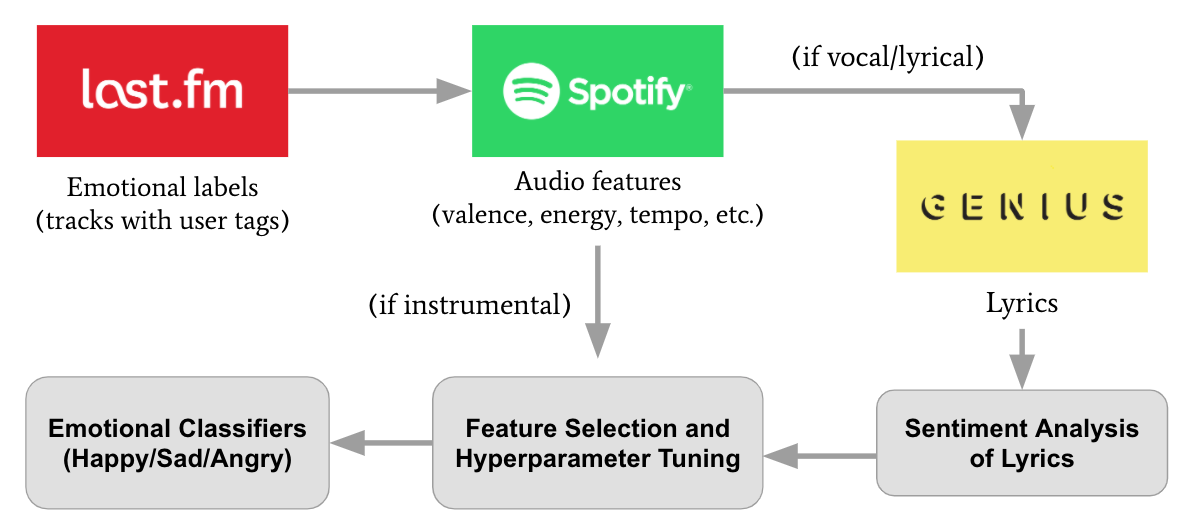
This post walks through the full pipeline: from disparate data sources and APIs used to build the training set, through the emotion classification models, to the Streamlit application that serves filtered results.
Data Sources and the Training Pipeline
Building a labeled dataset for emotion was the main challenge. I needed a large set of tracks with emotional labels, then rich features (audio and, for vocal music, lyrics) to train classifiers. No single API provided all of this, so I combined three sources.
Last.fm (Million Songs Dataset): Emotional Labels
The Million Song Dataset Last.fm subset provides user-generated tags for a huge number of tracks. I used two SQLite databases:
- track_metadata.db (artist, title, track IDs) and
- lastfm_tags.db (tags per track)
The notebooks define keyword lists for four emotions — happy, calm, sad, angry — and scan each track’s tags for matches. To avoid ambiguous tracks, a track is assigned to an emotion only if it has tags for that emotion and no tags from the other emotion lists.
This yields a labeled set of tracks that reflect user perception of emotion, which is exactly what we want for a mood-filtering product.
Spotify API: Audio Features
Once I had emotionally labeled tracks, I used the Spotify Web API (via the Spotipy Python library) to fetch audio features for each track:
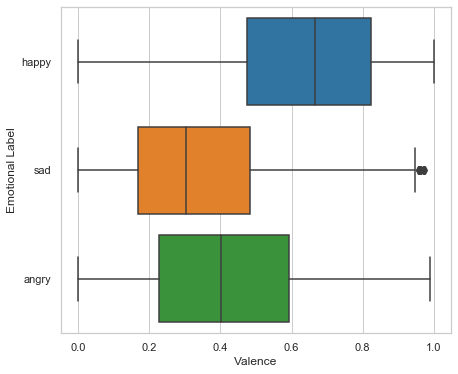
- Valence: positivity of sound (cheerful vs. sad), similar to sentiment
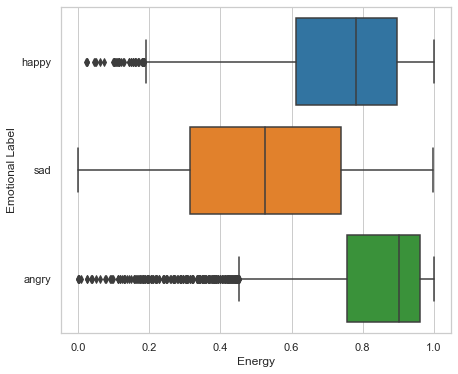
- Energy: how fast, loud, and noisy
- Danceability: how regular and strong is the tempo, rhythm
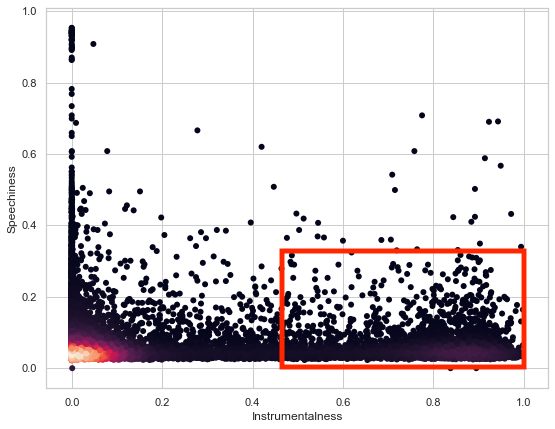
- Speechiness: < 0.33 “non-speech-like” tracks
- Acousticness: confidence that the track is acoustic
- Liveness: > 0.8 gives strong likelihood a crowd is present
- Instrumentalness: > 0.5 is typically instrumental
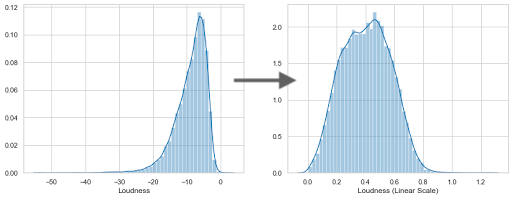
- Loudness: audio level dB (logarithmic)
- Tempo: speed/pace (i.e. beats per minute, BPM)
- Duration: length of the song (seconds)
- Key: musical key, the estimated foundational note or tonic
- Mode: modality, either Major (represented by 1) or Minor (represented by 0)
- Time Signature: defines the beats per measure and rhythmic feel
Search was done by track name and artist; the first match was taken. Because of rate limits and the size of the set, the Final notebook processes tracks in batches with sleep intervals.
Note that the different audio features separate the classes in complementary ways, which we can see by looking at the distributions by label.
Spotify’s instrumentalness and speechiness scores may also be leveraged to split the pipeline into two paths: one for instrumental tracks (instrumentalness > 0.45 and speechiness < 0.33) and one for vocal/lyrical tracks. The former are classified using audio features only; the latter additionally use lyrics-based sentiment.
There is an additional feature transformation I performed as well. Loudness is given in dB, which is logarithmic, so to provide better signal to the models I converted it to a linear scale: $10^{\text{loudness}/20}$.
Genius API: Lyrics and Sentiment for Vocal Tracks
For vocal/lyrical tracks, lyrics add important signal. I used the Genius API via LyricsGenius to fetch lyrics for each track in the labeled set. The notebooks enforce English-only lyrics (using langdetect) and use fuzzywuzzy to confirm that the Genius result matches the intended track title, reducing mislabeled training data.
For sentiment, I compared NLTK’s VADER (Valence Aware Dictionary and sEntiment Reasoner) with TextBlob; VADER gave better separation across the emotional classes.
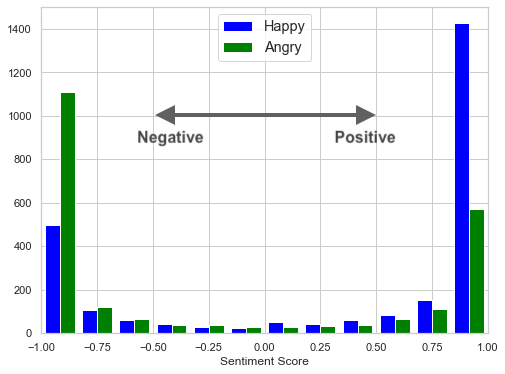
For each vocal track with lyrics, I computed a single compound sentiment score and used it alongside the Spotify audio features in the lyrical classifier.
Model Development: Two Classifiers
The goal was two separate classifiers: one for instrumental music (Spotify features only) and one for vocal/lyrical music (Spotify features plus lyrical sentiment).
The development notebook (Emotify_Project_Dev.ipynb) explores 4-label (happy, calm, sad, angry) and 3-label setups, plus logistic regression, SVM (SGD), and random forest. The final setup drops calm and uses happy, sad, and angry for both branches to improve class balance and focus; emotional ambiguit/overlap complicates matters here and so I kept things simple.
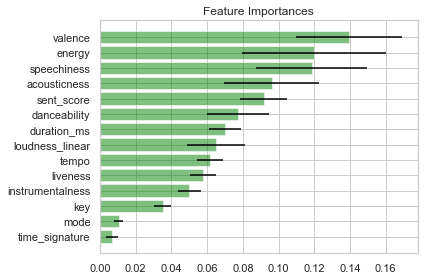
There was an iterative process here to prune features and understand their relative importance; this involved training the models and assessing the mean impurity decrease in the RFC models. (Impurity-based importance is known to inflate high-cardinality and continuous features, so I treated it as a rough guide, not ground truth.)
Instrumental Model
Training data is built from Total_Spotify_4Emotion_AllParts.csv by filtering to instrumental tracks (instrumentalness > 0.45, speechiness < 0.33) and removing the calm class. The features used are:
- Valence
- Energy
- Danceability
- Speechiness
- Acousticness
- Loudness (linear converted)
- Duration
The pipeline uses an 80/20 train-test split, StandardScaler fit on the training set, and a Random Forest classifier (with downsampling of majority classes as needed). Hyperparameters were tuned in the dev notebook; the final model is produced by build_final_model.py, which writes best_inst_scale.pkl and best_inst_rfc.pkl.
Lyrical Model
Training data comes from GeniusLyrics_VocalsOnlySet_FullFinal_withSentScores.csv, which holds vocal tracks with lyrics and precomputed sentiment scores. Again, the calm class is dropped. The lyrical model uses the lyrical sentiment score alongside the full set of Spotify audio features — the same ones the instrumental model uses, plus a few more:
- Sentiment score (VADER compound)
- Valence, Energy, Danceability
- Speechiness, Acousticness, Loudness (linear converted)
- Duration
- Key, Mode, Time Signature, Tempo
- Instrumentalness, Liveness
The same scaling and Random Forest workflow is used for the final model; build_final_model.py outputs best_lyrical_scale.pkl and best_lyrical_rfc.pkl.
Results
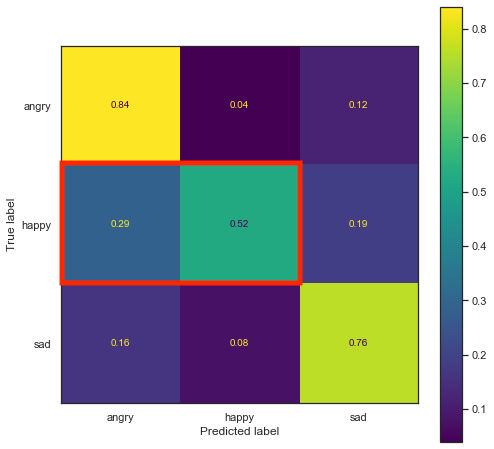
We can see from the confusion matrices for both "final" models that there's a similar (but inverse) overlap between "happy" and "angry" music for instrumental vs. lyrical music. Some additional analysis could dig deeper into the nuances of the crowd-sourced labels. The models land above the ~33% chance baseline for three classes, though the confusion matrices make clear this is modest in absolute terms — about what I'd expect for a proof-of-concept trained on noisy, user-generated emotion tags.
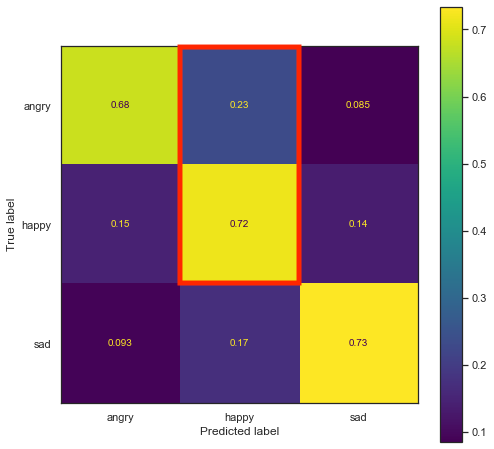
All model-building code — data loading, splitting, scaling, fitting, and saving — lives in the Emotify_Insight_Project repo (notebooks and build_final_model.py). The serialized scalers and classifiers are then used by the deployed app.
The Streamlit App and Deployment
The user-facing product is a Streamlit app in the Emotify_App repo. Emotify_App.py does the following:
- Loads the four artifacts (instrumental scaler + RFC, lyrical scaler + RFC) from a
models_v2/directory viaload_models(), cached with@st.cache(allow_output_mutation=True). - Authenticates with Spotify (client credentials) and Genius (API key) using environment variables:
SPOTIPY_CLIENT_ID,SPOTIPY_CLIENT_SECRET,GENIUS_API_KEY. - Accepts user input: a Spotify playlist ID or URI, a choice of “Instrumental” or “Lyrical/Vocal,” and an emotion (Happy, Sad, Angry).
- Fetches playlist tracks with
sp.user_playlist_tracks()and iterates over each track. For each track it retrieves Spotify audio features and decides whether the track is “lyrical” (instrumentalness < 0.45 or speechiness > 0.33) or instrumental, matching the training pipeline. - For lyrical tracks: fetches lyrics via Genius, checks title match (fuzzy) and English language, computes a VADER compound sentiment score, and runs the lyrical scaler + RFC. If the predicted emotion matches the user’s choice, the track is added to the result list.
- For instrumental tracks: applies the instrumental scaler + RFC; if the prediction matches the selected emotion, the track is added.
- Stops after 5 matching songs or after a 60-second timeout to keep the app responsive, then displays the matches with embedded Spotify players via
embed_spotify_track().
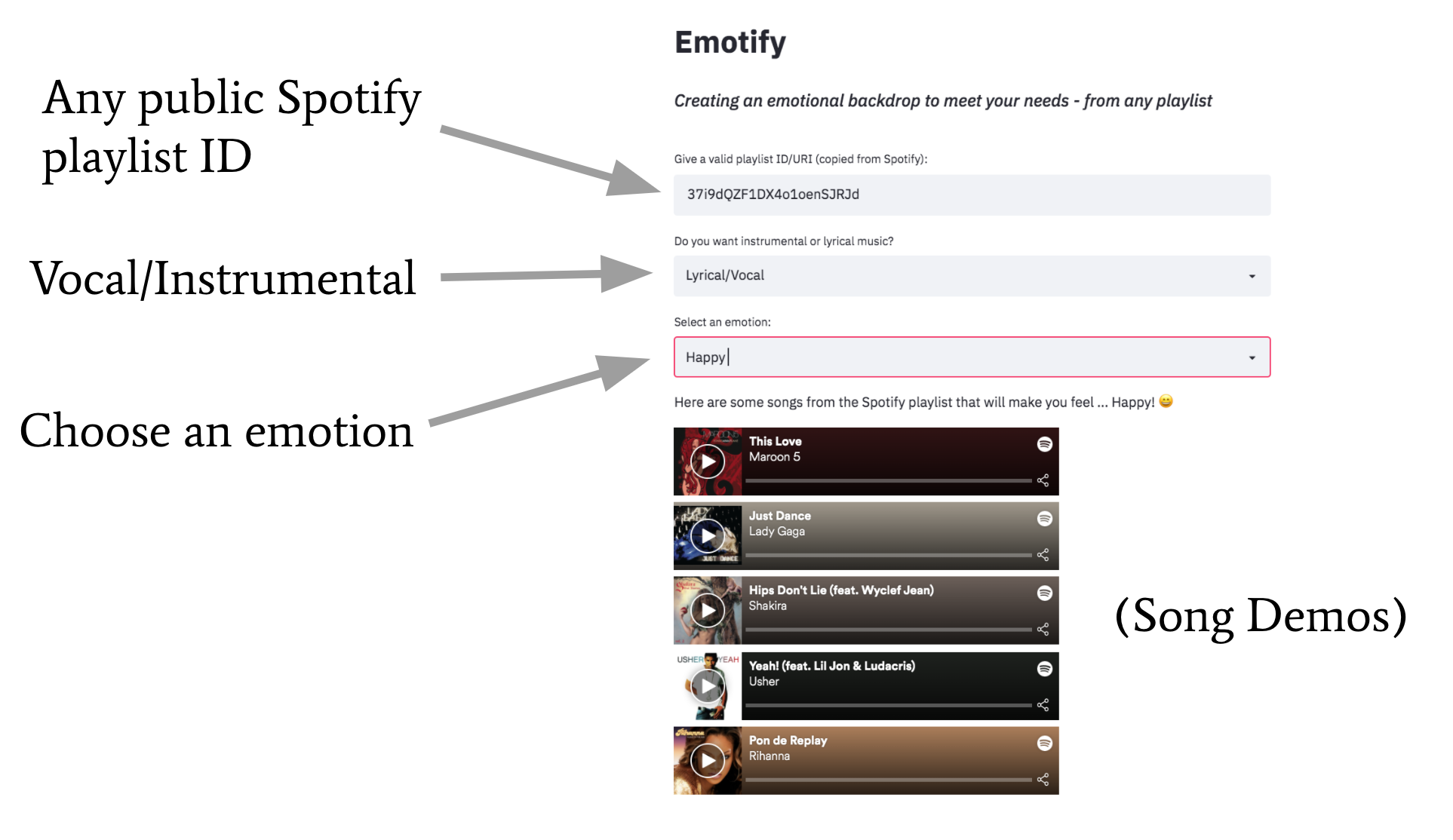
The app was deployed on an AWS EC2 instance. The server runs Python 3.7 with Streamlit and required packages.
The EC2 environment is configured with the same three environment variables so the app can call Spotify and Genius. The serialized models (models_v2/*.pkl) are placed on the instance so the app can load them at startup.
Once running, Streamlit is served (e.g. with a reverse proxy or by binding to the instance’s public address) so users can open the app in a browser and filter any public playlist by emotion.
Summary
Emotify ties together multiple data sources and a clear train/deploy split: Last.fm for emotional labels, Spotify for audio features and playlist content, and Genius for lyrics and sentiment on vocal tracks. Two Random Forest classifiers — one for instrumental and one for lyrical music — are trained in the Emotify_Insight_Project repo and serialized with their scalers.
The Emotify_App Streamlit app loads these models, authenticates with the APIs, and filters a user-supplied Spotify playlist by chosen emotion, with the app hosted on AWS EC2.
The live app was previously available at dataproject.xyz, but now must be run locally.